
P1 Orientation 2026
Find key information for your child's P1 journey in 2026, including booklists, uniforms, school bus services, and orientation slides.
Enrolment Information
P1 Booklist
P1 Booklist [PDF, 237.96 KB] (opens in new tab)
For Singapore Citizen students who intend to apply for MOE Financial Assistance Scheme (FAS), please do not make the purchase for books/shoes/socks until you are updated on the outcome of the MOE FAS application.
P1 Name Tags (Come back soon for updates on this page!)
School Uniform
Please find attached the updated information file.
OEPS School Uniform [PDF, 95.48 KB] (opens in new tab)
Information for Sale of Uniforms [PDF, 53.18 KB] (opens in new tab)
For Singapore Citizen students who intend to apply for MOE Financial Assistance Scheme (FAS), please do not make the purchase for school uniform until you are updated on the outcome of the MOE FAS application.
Pupils Data Capturing Exercise
As your child/ward will be starting primary one in January 2026, the Ministry of Education (MOE) would like to collect necessary information about you and your child/ward to provide educational services for your child/ward in our schools.
Please submit the information through the online Student Details Form portal from 1 Dec 2025, 10.00am. The portal can be accessed via this URL: https://pg.moe.edu.sg/forms/sdf, (opens in new tab) the Services page on Parents Gateway (PG) mobile app or the QR code below. Either parent can login to submit the required particulars. We seek your help to complete the submission by 31 Dec 2025.
Please note that only one parent (father or mother) is required to submit the pupil data to MOE. However, if the parent indicates that he/she is unable to provide his/her spouse’s highest educational level attended, the other parent will need to log in to submit the information.

QR code for the Pupils Data Capturing Exercise
Please note that only one parent (father or mother) is required to submit the pupil data to MOE. However, if the parent indicates that he/she is unable to provide his/her spouse’s highest educational level attended, the other parent will need to log in to submit the information.
Application for Interbank GIRO
Sign up for MOE eGiro through the online portal at https://www.moe.gov.sg/financial-matters/fees/egiro (opens in new tab) or from the “Services” tab in Parents Gateway app - “GIRO Setup” which will bring you to the same page for you to click “Apply for GIRO”.
Should you encounter error in the process, please provide screen captures as well as the time and date of application to MOE using the below Feedback Form https://www.moe.gov.sg/feedback (opens in new tab)
Edusave Scheme (for Singapore Citizens Students only)
All Singapore Citizens students will have an Edusave account automatically opened for them and receive a yearly contribution. For more information on Edusave Account, please refer to this link (opens in new tab).
Parents can sign up for Edusave standing order to use your child’s Edusave account to pay for the single tier miscellaneous fees and enrichment programmes to reduce your out-of-pocket expense. Complete the online Edusave Standing Order Form via this link (opens in new tab) with either parent's SingPass login.
MOE FAS (Financial Assistance Scheme)
a) Singapore Citizens who wish to apply for MOE FAS 2026, can do so via this mode: a) eFAS link in PG’s services section:
b) eFAS form via this link (opens in new tab). Along with the revised income eligibility criteria for MOE’s financial assistance schemes, MOE will onboard the Household Means Eligibility System (HOMES) to streamline application and means-testing processes from AY2026. With HOMES, most applicants no longer need to submit supporting documents, such as income documents. Applicants will only need to submit income documents if there is other administrative income (OAI), such as rental income, dividends and taxable investment income, declared by any household members living under the same residential address.
Applicants are highly encouraged to submit applications through the eFAS link, either through PG or the link provided above.
If your family and child is/children are existing beneficiary/beneficiaries of MSF ComCare, your child/children will be auto-granted MOE FAS. You do not need to apply for MOE FAS separately.
Should you require further assistance, please approach the General Office, call 6241 0417 or email to oeps@moe.edu.sg.
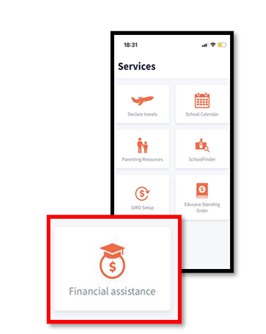
Applying for MOE FAS 2026 via the Parents Gateway services section
Consent for Dental Service
Please visit again in January 2026
Declaration for Student Travelling to School Using Bicycle or Kick Scooter
Parents who are allowing their children to travel to school via bicycle or kick scooter are required to submit a declaration through: https://go.gov.sg/oeps-cyclingtoschool (opens in new tab)
Parents Gateway
We strongly encourage all parents / guardians to come on board PG for quicker access to school information. Please refer to Annex A – One Time Onboarding for the step-by-step onboarding guide.
If you have any queries, you can refer to the FAQ link: PARENTSGATEWAY | FAQ: Official answers to your questions (opens in new tab) for help.
Annex A - One Time Onboarding [PDF, 883.24 KB] (opens in new tab)
P1 Information Booklet
OEPS Tour Video
P1 Orientation Briefing Slides
Transportation and Support Services
School Bus Service
Uncle Lin Transport is our appointed school bus service provider from 1 January 2026.
If you are interested to engage school bus service for your child in 2026, you may indicate your interest through the link: https://go.gov.sg/oeps-school-bus-request-form (opens in new tab), scan the QR Code or by reaching out to them at:
Contact Person: Wynnie
Contact Number: 9234 6908
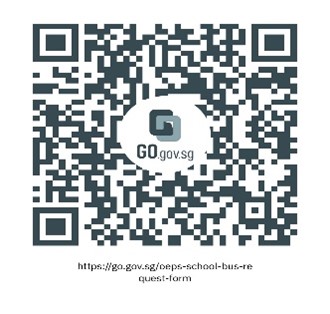
QR code for the school bus service request form
School-based Student Care Centre (SCC)
SCC Brochure: CLICK HERE (opens in new tab)
SCC Registration Form: CLICK HERE (opens in new tab)
Please refer to COVER LETTER (opens in new tab)for more information.
Expression of Interest:
https://www.knowledgepark.com.sg/operaestatescc (opens in new tab)
Opera Parents Club
Click HERE (opens in new tab) to see the poster.
Email us at oepsparents@gmail.com if you have any enquiries.
To sign up, you may submit by clicking this form (opens in new tab)
Thank you!
Parenting Resources
Transition from preschool to primary school
Click on the link below to read:
Raising a Happy, Confident, and Kind Generation Together
Click on the link below to read:
Establishing routines to help your child learn
Click on the link below to read:
Preparing for P1 through fun parent-child activities
Click on the link below to read:
How to help your child ace the first week of school
Click on the link below to read:
Supporting your Child’s Social Emotional Well-Being.
Click on the link below to read:
P1 ZOR Parent Engagement - E-Guide [PDF, 8.63 MB] (opens in new tab)